Ditching the WDS Mesh and Going HomePlug AV
 For a while now, the family computers were connected to the Internet using a couple of WiFi routers: one was in a WDS Mesh with my router upstairs in my office. The other router was simply a client set up in Client Bridge mode. All of the routers were Linksys WRT54G(S) running DD-WRT 2.4 SP1.
When I first set this up, I spent roughly two weeks diddling with it and finally got something stable. It generally stayed that way, though periodically, I’d experience random dropouts and other weirdness. The past several days, the WDS mesh would simply fail for no reason and despite my best efforts, I could not bring it up again.
I replaced my Linksys in my office with a UTM-1 EDGE W device I picked up from the office. This is an industrial strength firewall with WiFi, anti-virus at the gateway, and a lot of other cool security features in something about the size of a typical Linksys/D-Link router. I’m sure costs more than what most people want to spend on a router, given enterprises buy hundreds of them and manage them centrally. Home users can get a lot of the same functionality in the ZoneAlarm Z100G Secure Wireless Router for $150 shipped to your door (sorry, US and Canada only).
Unfortunately, this didn’t solve my WDS problem since the EDGE gateway does WDS differently than the Linksys boxes. I set both Linksys routers downstairs into Client Bridge mode temporarily, which allowed the Internet to work, albeit a little more slowly. Unfortunately, this is still not reliable as the WiFi periodically cuts out downstairs.
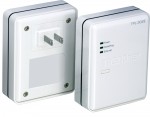
Today, I trekked over to Frys Electronics and picked up some HomePlug AV gear from TRENDnet (specifically the TRENDnet Tpl-302E2K 200Mbps Powerline Av Ethernet Adapter Kit

Setup was pretty easy, if you follow the included QuickStart guide. The TRENDnet software tool for configuring these devices (which, unfortunately, requires Windows) was able to find all three of my devices right away. It took me almost no time to get the devices connected together and passing traffic. One of the devices is plugged in near my router upstairs, the other two are downstairs in different rooms.
There are, of course, some limitations with these devices:
- The device–which is much larger than our typical wall-wort–partially blocks the other outlet. I found it worked if I used the top outlet and had the “bottom” facing upward.
- The device absolutely must be plugged in directly to the wall for it to work (i.e. no powerstrips).
- A maximum of 16 devices is supported.
- All devices must be on the same circuit breaker. This basically means you can only use these devices within a single dwelling.
While the TRENDnet Utility shows my devices not getting anywhere near the stated 200mb/s maximum throughput–the spec says the max data throughput is actually 150mb/s–I am getting anywhere from 10mb to 30mb/s to and from my locations. It’s at least as good as the WiFi link if not better as it’s more stable. I wish the price would come down a bit, but it’s still cheaper than cutting up drywall and adding in the necessary outlets.
![Reblog this post [with Zemanta]](http://img.zemanta.com/reblog_e.png?x-id=56352dbd-3717-4d11-890e-93c57183e6ed)